Monday, March 31, 2008

Free EBook - Windows Server PowerShell Scripting Step by Step
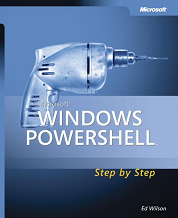
 

imageTeach yourself the fundamentals of Windows PowerShell command line interface and scripting language. Written by a leading scripting expert, this tutorial delivers self-paced labs, timesaving tips, and hands-on sample scripts for automating Windows administration—one step at a time.


Discover how to:

•Use built-in cmdlets to execute commands
•Write scripts to handle recurring tasks and configure scheduled jobs
•Use providers to access information external to the shell environment
•Configure network components using Windows Management Instrumentation (WMI)
•Manage users, groups, and computers with Active Directory Services
•Execute scripts for administering and troubleshooting Microsoft Exchange Server 2007
•PLUS—Get a complete list of cmdlet commands and a guide for moving from VBScript to Windows Powershell


Register and Download

Free EBook - Introducing Windows Server 2008


2008

Get a jump on evaluating Window Server 2008 - with technical insights from Windows Server team. This practical introduction delivers real-world implementation scenarios and pragmatic advice for administering Windows Server in the enterprise.


About the book:

•Deploy Windows Server 2008, and configure and manage server roles
•Understand Windows Server Virtualization
•Implement a single, integrated IDA solution built on Active Directory
•Explore enhancements in Internet Information Services 7.0
•Use failover clustering for high-availability solutions
•Implement the Network Access Protection platform


Register and Download

Friday, March 28, 2008

NetCmdlets V2.0 - BETA


/n software NetCmdlets extend the features of Microsoft Windows PowerShell with a broad range of network management and messaging capabilities. The current release contains more than 30 Cmdlets providing access to network and host protocols such as SNMP, LDAP, DNS, Syslog, HTTP, WebDav, FTP, SMTP, POP, IMAP, Rexec/RShell, Telnet, and more.

Using Windows PowerShell and NetCmdlets, System Administrators can easily script common network management tasks including router configuration, switch port monitoring, directory access, VLAN administration, remote execution, etc.

NetCmdlets V2 is packed full of exciting new features including PowerShell Server (formerly PowerShell Remoting), Parameter Sets, Object Pipelining, and new Cmdlets for SSH Enabled Remoting and Amazon Web Services (S3) Integration.

Check out the new features in this release or download the beta!

Sunday, March 23, 2008

Windows Server Core - CoreConfigurator to the rescue


If you need to configure Server Core to get your installation up and running but you're not
a command-line expert then check CoreConfigurator.

Guy Teverovsky, Windows Server MVP, comes to rescue with a simple GUI utility to do all the
hard work for you.


CoreConfigurator Features:

  • Product Activation
  • Configuration of display resolution
  • Clock and time zone configuration
  • Remote Desktop configuration
  • Management of local user accounts (creation, deletion, group membership, passwords)
  • Firewall configuration
  • WinRM configuration
  • IP configuration
  • Computer name and domain/workgroup membership
  • Installation of Server Core features/roles


Here's a screenshot of the main screen:


Thursday, March 20, 2008

Create Certificate for Exchange 2007 Servers using Windows CA


Ronen Gabbay [MVP], Microsoft Exchange Regional Director (and my Exchange 2007 course instructor), shows how you can create Certificate for Exchange 2007 Servers using Windows CA for SSL, OWA and SMTP use.

Wednesday, March 19, 2008

2008 Scripting games prizes


I got an email from Greg Stemp, the Scripting Guy. He notified me that I won a licensed copy of ShellTools' PowerShell Analyzer/PowerShell Plus and a PowerShell T-shirt. I'm also eligible for a Scripting Games Certificate of Excellence. WOW, Thank you!

Monday, March 17, 2008

TechNet Webcsat: 24 Hours of Windows Server 2008


Prepare yourself for the next release of Microsoft’s server operating system - Windows Server 2008. Tune in and learn how you can leverage the new features to improve your organization's networking infrastructure and security, server performance and reliability, remote resource access, and client deployment. Subject matter experts break down what these upgrades mean for your environment and how to take advantage of them.

There is also an interactive Webcast Calendar where you can quickly find live webcasts that fit your schedule as well as on-demand webcasts to view at your convenience. You can choose your time zone and filter the list by audience, webcast series, product or topic, and Presenter.


On-Demand Webcasts

24 Hours of Windows Server 2008 (Part 01 of 24): Overview (Level 200)

24 Hours of Windows Server 2008 (Part 02 of 24): Server Virtualization with Hyper-V Features and Architecture (Level 200)

24 Hours of Windows Server 2008 (Part 03 of 24): Managing Hyper-V (Level 200)


Live Webcasts

24 Hours of Windows Server 2008 (Part 04 of 24): Presentation Virtualization with Terminal Services RemoteApp (Level 200)

Friday, March 14, 2008
9:30 A.M.–11:00 A.M. Pacific Time


24 Hours of Windows Server 2008 (Part 05 of 24): Terminal Services Gateway and Terminal Services Web Access (Level 200)

Wednesday, March 19, 2008
9:30 A.M.–11:00 A.M. Pacific Time


24 Hours of Windows Server 2008 (Part 06 of 24): Deploying and Migrating to Terminal Server (Level 200)

Friday, March 21, 2008
9:30 A.M.–11:00 A.M. Pacific Time


24 Hours of Windows Server 2008 (Part 07 of 24): IIS 7.0 Overview and Architecture (Level 200)

Wednesday, March 26, 2008
9:30 A.M.–11:00 A.M. Pacific Time


24 Hours of Windows Server 2008 (Part 08 of 24): IIS 7.0 Advanced Management (Level 200)

Friday, March 28, 2008
9:30 A.M.–11:00 A.M. Pacific Time