Stand alone registry functions library
The following file (also included below) contains 20 stand alone registry functions to Read,Write,Delete,Test registry keys/values from local or remote computer. Here's a list of the functions:
Get-RegBinary
Get-RegDWord
Get-RegDefault
Get-RegExpandString
Get-RegMultiString
Get-RegQuadWord
Get-RegString
Get-RegValueKind
New-RegSubKey
Remove-RegSubKey
Remove-RegSubKeyTree
Set-RegBinary
Set-RegDWord
Set-RegDefault
Set-RegExpandString
Set-RegMultiString
Set-RegQuadWord
Set-RegString
Test-RegSubKey
Test-RegValue
For all functions, values for registry hive can be one of the enum values for
[Microsoft.Win32.RegistryHive]. To get a list of possible values type:
[enum]::getnames([Microsoft.Win32.RegistryHive])
Values for registry value kind can be one of the enum values for
[Microsoft.Win32.RegistryValueKind]. To get a list of possible kind values type:
[enum]::getnames([Microsoft.Win32.RegistryValueKind])
NOTE: get/set the CurrentUser hive on a remote server is N/A
Your comments/suggestions will be much appreciated. Please report any bugs to this post in the comments below.
Also, ping remote computers before running remote registry functions. You can read more about it here.
To load all functions in one step, "dot source" the file in the console or in your PowerShell profile. Type:
. <path_to_file.ps1>
Some code examples (using positioned parameters):
# create new sub key
New-RegSubKey . CurrentUser software\CustomRegKey
# set the default value
Set-RegDefault . CurrentUser software\CustomRegKey "This is the Default value";
# create String value
Set-RegString . CurrentUser software\CustomRegKey RegString "Shay Levi";
# create Multiple string value
Set-RegMultiString . CurrentUser software\CustomRegKey RegMultiString @("Power","Shell","Rocks!");
# create binary value
Set-RegBinary . CurrentUser software\CustomRegKey RegBinary @([char[]]"PowerShell");
# create dword value
Set-RegDWord . CurrentUser software\CustomRegKey RegDWord 123;
# create expand value
Set-RegExpandString . CurrentUser software\CustomRegKey RegExpandString "Username is %USERNAME%";
# create quadword value
Set-RegQuadWord . CurrentUser software\CustomRegKey RegQuadWord 10;
# test existence of a key named "notexist", locally, under hkcu:\softaware, returns $false
Test-RegSubKey . CurrentUser software\notexist
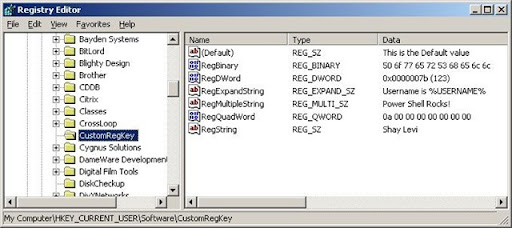
Now, get the values:
# get the default value
PS > Get-RegDefault . CurrentUser software\CustomRegKey
This is the Default value
PS > # Get String value
PS > Get-RegString . CurrentUser software\CustomRegKey RegString
Shay Levi
# Get Multiple string value, returns array object
PS > Get-RegMultiString . CurrentUser software\CustomRegKey RegMultiString
Power
Shell
Rocks!
# Get binary value
PS > Get-RegBinary . CurrentUser software\CustomRegKey RegBinary
80
111
119
101
114
83
104
101
108
108
# Get Expand String value, not expanded
PS > Get-RegExpandString . CurrentUser software\CustomRegKey RegExpandString
Username is %USERNAME%
# Get Expand String value, expanded
PS > Get-RegExpandString . CurrentUser software\CustomRegKey RegExpandString -expand
Username is ShayL
# Get quadword value
PS > Get-RegQuadWord . CurrentUser software\CustomRegKey RegQuadWord;
10
#Get non existent value name, returns the default string defind by $defaultValue
PS > Get-RegString . CurrentUser software\CustomRegKey NonExistValueName "my default"
my default
####################################################
function Get-RegString{
param(
[string]$server = ".",
[string]$hive,
[string]$keyName,
[string]$valueName,
[object]$defaultValue="Your default value"
)
$hives = [enum]::getnames([Microsoft.Win32.RegistryHive])
if($hives -notcontains $hive){
write-error "Invalid hive value";
return;
}
$regHive = [Microsoft.Win32.RegistryHive]$hive;
$regKey = [Microsoft.Win32.RegistryKey]::OpenRemoteBaseKey($regHive,$server);
$subKey = $regKey.OpenSubKey($keyName);
if(!$subKey){
write-error "The specified registry key does not exist.";
return;
}
$subKey.GetValue($valueName,$defaultValue);
}
###############################################################################
# Function: Set-RegString
# Description: Create/Update the specified registry string value
# Return Value: True/false respectively
function Set-RegString{
param(
[string]$server = ".",
[string]$hive,
[string]$keyName,
[string]$valueName,
[string]$value
)
$hives = [enum]::getnames([Microsoft.Win32.RegistryHive])
if($hives -notcontains $hive){
write-error "Invalid hive value";
return;
}
$regHive = [Microsoft.Win32.RegistryHive]$hive;
$regKey = [Microsoft.Win32.RegistryKey]::OpenRemoteBaseKey($regHive,$server);
$subKey = $regKey.OpenSubKey($keyName,$true);
if(!$subKey){
write-error "The specified registry key does not exist.";
return;
}
$subKey.SetValue($valueName, $value, [Microsoft.Win32.RegistryValueKind]::String);
if($?) {$true} else {$false}
}
###############################################################################
# Function: Get-RegMultiString
# Description: Gets an array strings (REG_MULTI_SZ)
# Return Value: Array object
function Get-RegMultiString{
param(
[string]$server = ".",
[string]$hive,
[string]$keyName,
[string]$valueName,
[object]$defaultValue="Your default value"
)
$hives = [enum]::getnames([Microsoft.Win32.RegistryHive])
if($hives -notcontains $hive){
write-error "Invalid hive value";
return;
}
$regHive = [Microsoft.Win32.RegistryHive]$hive;
$regKey = [Microsoft.Win32.RegistryKey]::OpenRemoteBaseKey($regHive,$server);
$subKey = $regKey.OpenSubKey($keyName);
if(!$subKey){
write-error "The specified registry key does not exist.";
return;
}
$subKey.GetValue($valueName,$defaultValue);
}
###############################################################################
# Function: Set-RegMultiString
# Description: Create/Update the specified registry as strings array (REG_MULTI_SZ)
# Return Value: True/false respectively
function Set-RegMultiString{
param(
[string]$server = ".",
[string]$hive,
[string]$keyName,
[string]$valueName,
[String[]]$value
)
$hives = [enum]::getnames([Microsoft.Win32.RegistryHive])
if($hives -notcontains $hive){
write-error "Invalid hive value";
return;
}
$regHive = [Microsoft.Win32.RegistryHive]$hive;
$regKey = [Microsoft.Win32.RegistryKey]::OpenRemoteBaseKey($regHive,$server);
$subKey = $regKey.OpenSubKey($keyName,$true);
if(!$subKey){
write-error "The specified registry key does not exist.";
return;
}
$subKey.SetValue($valueName, $value,[Microsoft.Win32.RegistryValueKind]::MultiString);
if($?) {$true} else {$false}
}
###############################################################################
# Function: Get-RegBinary
# Description: Gets the registry value (REG_BINARY)
# Return Value: Array object
function Get-RegBinary{
param(
[string]$server = ".",
[string]$hive,
[string]$keyName,
[string]$valueName,
[object]$defaultValue="Your default value"
)
$hives = [enum]::getnames([Microsoft.Win32.RegistryHive])
if($hives -notcontains $hive){
write-error "Invalid hive value";
return;
}
$regHive = [Microsoft.Win32.RegistryHive]$hive;
$regKey = [Microsoft.Win32.RegistryKey]::OpenRemoteBaseKey($regHive,$server);
$subKey = $regKey.OpenSubKey($keyName);
$subKey.GetValue($valueName,$defaultValue);
}
###############################################################################
# Function: Set-RegBinary
# Description: Create/Update the registry value (REG_BINARY)
# Return Value: True/false respectively
function Set-RegBinary{
param(
[string]$server = ".",
[string]$hive,
[string]$keyName,
[string]$valueName,
[byte[]]$value
)
$hives = [enum]::getnames([Microsoft.Win32.RegistryHive])
if($hives -notcontains $hive){
write-error "Invalid hive value";
return;
}
$regHive = [Microsoft.Win32.RegistryHive]$hive;
$regKey = [Microsoft.Win32.RegistryKey]::OpenRemoteBaseKey($regHive,$server);
$subKey = $regKey.OpenSubKey($keyName,$true);
if(!$subKey){
write-error "The specified registry key does not exist.";
return;
}
$subKey.SetValue($valueName, $value,[Microsoft.Win32.RegistryValueKind]::Binary);
if($?) {$true} else {$false}
}
###############################################################################
# Function: Set-RegDWord
# Description: Create/Update the registry value (REG_DWORD)
# Return Value: True/false respectively
function Set-RegDWord{
param(
[string]$server = ".",
[string]$hive,
[string]$keyName,
[string]$valueName,
[double]$value
)
$hives = [enum]::getnames([Microsoft.Win32.RegistryHive])
if($hives -notcontains $hive){
write-error "Invalid hive value";
return;
}
$regHive = [Microsoft.Win32.RegistryHive]$hive;
$regKey = [Microsoft.Win32.RegistryKey]::OpenRemoteBaseKey($regHive,$server);
$subKey = $regKey.OpenSubKey($keyName,$true);
if(!$subKey){
write-error "The specified registry key does not exist.";
return;
}
$subKey.SetValue($valueName, $value,[Microsoft.Win32.RegistryValueKind]::DWord);
if($?) {$true} else {$false}
}
###############################################################################
# Function: Get-RegDWord
# Description: Gets the registry value (REG_DWORD)
# Return Value: registry dword value
function Get-RegDWord{
param(
[string]$server = ".",
[string]$hive,
[string]$keyName,
[string]$valueName,
[object]$defaultValue="Your default value"
)
$hives = [enum]::getnames([Microsoft.Win32.RegistryHive])
if($hives -notcontains $hive){
write-error "Invalid hive value";
return;
}
$regHive = [Microsoft.Win32.RegistryHive]$hive;
$regKey = [Microsoft.Win32.RegistryKey]::OpenRemoteBaseKey($regHive,$server);
$subKey = $regKey.OpenSubKey($keyName);
if(!$subKey){
write-error "The specified registry key does not exist.";
return;
}
$subKey.GetValue($valueName,$defaultValue);
}
###############################################################################
# Function: Set-RegExpandString
# Description: Create/Update the registry value (REG_EXPAND_SZ)
# Return Value: True/false respectively
function Set-RegExpandString{
param(
[string]$server = ".",
[string]$hive,
[string]$keyName,
[string]$valueName,
[string]$value
)
$hives = [enum]::getnames([Microsoft.Win32.RegistryHive])
if($hives -notcontains $hive){
write-error "Invalid hive value";
return;
}
$regHive = [Microsoft.Win32.RegistryHive]$hive;
$regKey = [Microsoft.Win32.RegistryKey]::OpenRemoteBaseKey($regHive,$server);
$subKey = $regKey.OpenSubKey($keyName,$true);
if(!$subKey){
write-error "The specified registry key does not exist.";
return;
}
$subKey.SetValue($valueName, $value,[Microsoft.Win32.RegistryValueKind]::ExpandString);
if($?) {$true} else {$false}
}
###############################################################################
# Function: Set-RegExpandString
# Description: Get the registry value (REG_EXPAND_SZ)
# Return Value: registry value expanded or not based on -expand switch
function Get-RegExpandString{
param(
[string]$server = ".",
[string]$hive,
[string]$keyName,
[string]$valueName,
[object]$defaultValue="Your default value",
[switch]$expand
)
$hives = [enum]::getnames([Microsoft.Win32.RegistryHive])
if($hives -notcontains $hive){
write-error "Invalid hive value";
return;
}
$regHive = [Microsoft.Win32.RegistryHive]$hive;
$regKey = [Microsoft.Win32.RegistryKey]::OpenRemoteBaseKey($regHive,$server);
$subKey = $regKey.OpenSubKey($keyName);
if(!$subKey){
write-error "The specified registry key does not exist.";
return;
}
if($expand){
$subKey.GetValue($valueName,$defaultValue);
} else {
$subKey.GetValue($valueName,$defaultValue,[Microsoft.Win32.RegistryValueOptions]::DoNotExpandEnvironmentNames);
}
}
###############################################################################
# Function: Get-RegQuadWord
# Description: get the registry value (REG_QWORD)
# Return Value: registry value
function Get-RegQuadWord{
param(
[string]$server = ".",
[string]$hive,
[string]$keyName,
[string]$valueName,
[object]$defaultValue="Your default value"
)
$hives = [enum]::getnames([Microsoft.Win32.RegistryHive])
if($hives -notcontains $hive){
write-error "Invalid hive value";
return;
}
$regHive = [Microsoft.Win32.RegistryHive]$hive;
$regKey = [Microsoft.Win32.RegistryKey]::OpenRemoteBaseKey($regHive,$server);
$subKey = $regKey.OpenSubKey($keyName);
if(!$subKey){
write-error "The specified registry key does not exist.";
return;
}
$subKey.GetValue($valueName,$defaultValue);
}
###############################################################################
# Function: Set-RegExpandString
# Description: Get the registry value (REG_QWORD)
# Return Value: True/false respectively
function Set-RegQuadWord{
param(
[string]$server = ".",
[string]$hive,
[string]$keyName,
[string]$valueName,
[long]$value
)
$hives = [enum]::getnames([Microsoft.Win32.RegistryHive])
if($hives -notcontains $hive){
write-error "Invalid hive value";
return;
}
$regHive = [Microsoft.Win32.RegistryHive]$hive;
$regKey = [Microsoft.Win32.RegistryKey]::OpenRemoteBaseKey($regHive,$server);
$subKey = $regKey.OpenSubKey($keyName,$true);
if(!$subKey){
write-error "The specified registry key does not exist.";
return;
}
$subKey.SetValue($valueName, $value,[Microsoft.Win32.RegistryValueKind]::QWord);
if($?) {$true} else {$false}
}
###############################################################################
# Function: Get-RegDefault
# Description: Get the registry default value
# Return Value: registry default value
function Get-RegDefault{
param(
[string]$server = ".",
[string]$hive,
[string]$keyName
)
$hives = [enum]::getnames([Microsoft.Win32.RegistryHive])
if($hives -notcontains $hive){
write-error "Invalid hive value";
return;
}
$regHive = [Microsoft.Win32.RegistryHive]$hive;
$regKey = [Microsoft.Win32.RegistryKey]::OpenRemoteBaseKey($regHive,$server);
$subKey = $regKey.OpenSubKey($keyName);
if(!$subKey){
write-error "The specified registry key does not exist.";
return;
}
$subKey.GetValue($null);
}
###############################################################################
# Function: Set-RegDefault
# Description: Set the registry default value
# Return Value: True/false respectively
function Set-RegDefault{
param(
[string]$server = ".",
[string]$hive,
[string]$keyName,
$value
)
$hives = [enum]::getnames([Microsoft.Win32.RegistryHive])
if($hives -notcontains $hive){
write-error "Invalid hive value";
return;
}
$regHive = [Microsoft.Win32.RegistryHive]$hive;
$regKey = [Microsoft.Win32.RegistryKey]::OpenRemoteBaseKey($regHive,$server);
$subKey = $regKey.OpenSubKey($keyName,$true);
if(!$subKey){
write-error "The specified registry key does not exist.";
return;
}
#$regKey.SetValue($null, $value,[Microsoft.Win32.RegistryValueKind]::String);
$subKey.SetValue($null, $value,[Microsoft.Win32.RegistryValueKind]::String);
if($?) {$true} else {$false}
}
###############################################################################
# Function: New-RegSubKey
# Description: Create the registry key
# Return Value: True/false respectively
function New-RegSubKey{
param(
[string]$server = ".",
[string]$hive,
[string]$keyName
)
$hives = [enum]::getnames([Microsoft.Win32.RegistryHive])
if($hives -notcontains $hive){
write-error "Invalid hive value";
return;
}
$regHive = [Microsoft.Win32.RegistryHive]$hive;
$regKey = [Microsoft.Win32.RegistryKey]::OpenRemoteBaseKey($regHive,$server);
[void]$regKey.CreateSubKey($keyName);
if($?) {$true} else {$false}
}
################################################################################
# Function: Remove-RegSubKey
# Description: Delete the registry key
# Return Value: Throws error in case the key doesnt exist
function Remove-RegSubKey{
param(
[string]$server = ".",
[string]$hive,
[string]$keyName
)
$hives = [enum]::getnames([Microsoft.Win32.RegistryHive])
if($hives -notcontains $hive){
write-error "Invalid hive value";
return;
}
$regHive = [Microsoft.Win32.RegistryHive]$hive;
$regKey = [Microsoft.Win32.RegistryKey]::OpenRemoteBaseKey($regHive,$server);
$regKey.DeleteSubKey($keyName,$true);
}
###############################################################################
# Function: Remove-RegSubKeyTree
# Description: Delete the registry key tree
# Return Value: None
function Remove-RegSubKeyTree{
param(
[string]$server = ".",
[string]$hive,
[string]$keyName
)
$hives = [enum]::getnames([Microsoft.Win32.RegistryHive])
if($hives -notcontains $hive){
write-error "Invalid hive value";
return;
}
$regHive = [Microsoft.Win32.RegistryHive]$hive;
$regKey = [Microsoft.Win32.RegistryKey]::OpenRemoteBaseKey($regHive,$server);
$regKey.DeleteSubKeyTree($keyName);
}
###############################################################################
# Function: Get-RegValueKind
# Description: Get the registry value type (e.g, string,dword etc)
# Return Value: None
function Get-RegValueKind{
param(
[string]$server = ".",
[string]$hive,
[string]$keyName,
[string]$valueName
)
$hives = [enum]::getnames([Microsoft.Win32.RegistryHive])
if($hives -notcontains $hive){
write-error "Invalid hive value";
return;
}
$regHive = [Microsoft.Win32.RegistryHive]$hive;
$regKey = [Microsoft.Win32.RegistryKey]::OpenRemoteBaseKey($regHive,$server);
$subKey = $regKey.OpenSubKey($keyName);
if(!$subKey){
write-error "The specified registry key does not exist.";
return;
}
$regVal=$subKey.GetValueKind($valueName);
if(!$regVal){
write-error "The specified registry value does not exist.";
return;
} else {
$regVal;
}
}
###############################################################################
# Function: Test-RegSubKey
# Description: Test the existence of the registry key
# Return Value: True/false respectively
function Test-RegSubKey{
param(
[string]$server = ".",
[string]$hive,
[string]$keyName
)
$hives = [enum]::getnames([Microsoft.Win32.RegistryHive])
if($hives -notcontains $hive){
write-error "Invalid hive value";
return;
}
$regHive = [Microsoft.Win32.RegistryHive]$hive;
$regKey = [Microsoft.Win32.RegistryKey]::OpenRemoteBaseKey($regHive,$server);
$subKey = $regKey.OpenSubKey($keyName);
if(!$subKey){$false} else {$true}
}
###############################################################################
# Function: Test-RegValue
# Description: Test the existence of the registry value
# Return Value: True/false respectively
function Test-RegValue{
param(
[string]$server = ".",
[string]$hive,
[string]$keyName,
[string]$valueName
)
$hives = [enum]::getnames([Microsoft.Win32.RegistryHive])
if($hives -notcontains $hive){
write-error "Invalid hive value";
return;
}
$regHive = [Microsoft.Win32.RegistryHive]$hive;
$regKey = [Microsoft.Win32.RegistryKey]::OpenRemoteBaseKey($regHive,$server);
$subKey = $regKey.OpenSubKey($keyName);
if(!$subKey){
write-error "The specified registry key does not exist.";
return;
}
$regVal=$subKey.GetValue($valueName);
if(!$regVal){$false} else {$true}
}



 RSS Feed


