Wednesday, January 23, 2008

PowerScripting Podcast #17


In this episode you'll get to meet the Girls and Boys, Jean and Greg, the "Guy's" behind the "Scripting Guy's" TechNet column. BTW, you can watch a video on MSDN TV The .NET Show: WMI Scripting (recorded April 07, 2006) where you can actually see them.

P.S. Best regards to Jonathan, be well!

Tuesday, January 22, 2008

Reposting


I've noticed that some of my older posts has lost their formatting, not sure why, so I'm going to reformat and repost them again.

Monday, January 21, 2008

PowerShell at the tip of your browser


I've created a PowerShell browser toolbar using Conduit community toolbars. It provides one-click access to many PowerShell related resources. Any changes I'll make to the toolbar will automatically be seen by users who installed it, no need to reinstall. The toolbar works on IE and also on any platform that Firefox runs on: Mac, Linux and Windows. If you want the toolbar to be available for both browsers, run setup on each one separately.

If what preventing you from installing it is your precious screen space, remember, you can always hide it.

If you feel I missed something or someone please leave a comment at the bottom of this page. The toolbar is still in progress and will be updated constantly. Here's how it looks:


(The image is sliced due to display width restrictions)

toolbar1


You can access the toolbar (display it) on any windows explorer window, not necessarily Internet Explorer, Just go to View > Toolbars > PowerShell Toolbar

computer 


Options

Click the Toolbar Options menu arrow:


main

In the Toolbar Options you can configure additional components to appear on your toolbar including Email notifier, add or remove buttons or gadgets like the Radio Player or add shortcuts to your favorite commonly-used applications.  

Notice that you can "Refresh Toolbar" for the last changes to appear.


Web Search
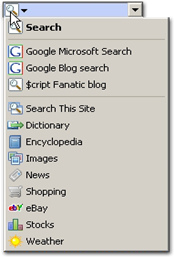
search

All web search is powered by Google. Besides the default "Search" entry I've added additional search providers to the bar. For example, the "Google Microsoft search" option allows you to search inside Microsoft related sites. There's also the option to search blogs with "Google blog search".

Here's how it looks when searching for PowerShell.
There is a button in the toolbar to highlight the search term inside the page.

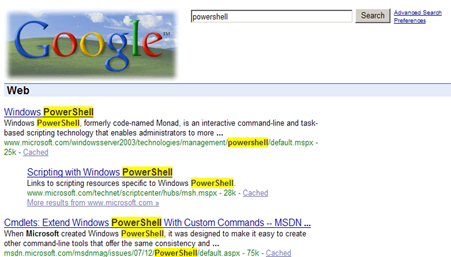
highlight copy1 
highlight copy  


Your search terms history can be viewed and cleared by clicking on the search arrow.
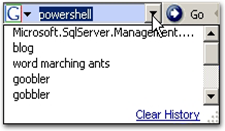
search1


Blogs

Various PowerShell blogs. Drop me a line if you blog doesn't appear.
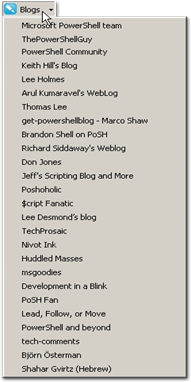
blogs copy


Download

Need to download PowerShell? Get All PowerShell versions and requirement software.
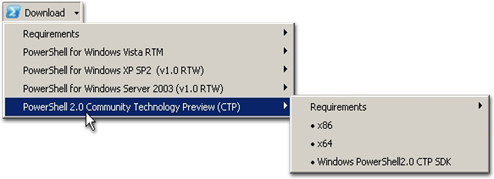
download copy


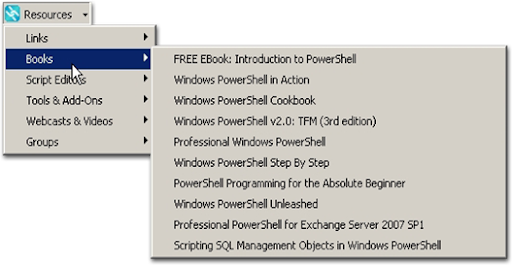
Resources


resources


Radio

Here you can define additional radio stations based on your location. Notice that you can listen to all PowerScripting Podcasts directly from the toolbar.

radio


Chat

The Chat button provides you with a way to communicate with all other users that use this toolbar. So, click Chat and choose a nick name to start chatting.


chat copy


Messages

The Message box allows communication with users in "real time" (15 min). I'll use this feature to send notifications when new content is added to the toolbar.
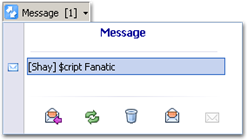

 msg


Weather

What's it like outside? Click the Weather button to see your local forecast. the Weather icon changes dynamically according to your current weather conditions.

This component automatically configures itself to your current location, according to your computer's IP. You ca also use this component to check out the weather in thousands of locations around the world.
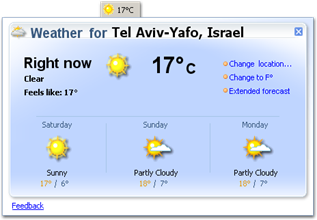
weather

 
IE Uninstall
  • Click Start, Settings, and go to Control Panel.
  • Locate the Add/Remove Programs.
  • Search for "PowerShell Toolbar".
  • Select Change/Remove.


    ieuninstall


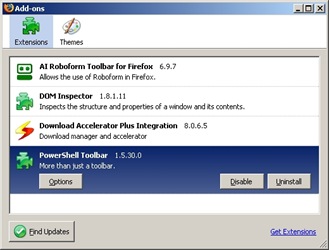
    Firefox Uninstall

  • Open the browser and select Tools from the menu.
  • Select Add-ons.
  • Select the Extensions tab.
  • Find the toolbar and select Uninstall.
     

    ffuninstall


    That's it. You're all invited to install and explore it. If you find it useful or having improvement suggestion, drop me a line. Click here to install the toolbar.


  • Sunday, January 20, 2008

    Free NetCmdlets license

    via Lance Robinson


    netcmdlets/n software's NetCmdlets extend the features of Microsoft Windows PowerShell with a broad range of network management and messaging capabilities. The current release contains more than 30 Cmdlets providing access to network and host protocols such as SNMP, LDAP, DNS, Syslog, HTTP, WebDav, FTP, SMTP, POP, IMAP, Rexec/RShell, Telnet, and more.


    NetCmdlets is available for free for non-commercial use.  Check out the NetCmdlets hobbyist license here.

    The ordering process does not require a credit card unless you request a physical cd shipment.  For electronic download, just be sure to enter your name and email address!

    Friday, January 18, 2008

    Releasing the Source Code for the .NET Framework Libraries


    This may be outdated but I've just found it :)

    ScottGu's Blog reports that the Microsoft's .NET Framework Library Source Code is available for viewing and debugging with .NET 3.5 and VS 2008.

    The first .NET Base Class Libraries to be released (with source file comments included) are:

    • System
    • System.IO
    • System.Collections
    • System.Configuration
    • System.Threading
    • System.Net
    • System.Security
    • System.Runtime
    • System.Text
    • ASP.NET (System.Web)
    • Windows Forms (System.Windows.Forms)
    • ADO.NET (System.Data)
    • XML (System.Xml)
    • WPF (System.Windows)

    New libraries will be released in the months ahead (including WCF, Workflow, and LINQ). The source code will be released under the Microsoft Reference License (MS-RL).

    The .NET Framework source libraries will be available for download via a standalone install. and can be viewed with any text editor. It will also provide integrated debugging support from within VS 2008, enabling developers to step through and review the source.

    To learn more about the source release plans and how the debugger integration works, please check out this Podcast that Scott Hanselman and Shawn Burke recently recorded.  There is also a video by Shawn Burke on Channel9 that shows how integrated debugging support works in VS 2008.

    Professional Windows PowerShell for Exchange Server 2007 SP1

     0470226447

    New book, by WROX, on managing Exchange 2007 SP1 with Windows PowerShell has just released.


    Book Description

    If you want to dramatically improve your implementation and administration of Exchange Server 2007, then this is the book for you. It walks you through the ins and outs of PowerShell, showing you how to take full advantage of this scripting language for deploying, configuring, managing, and maintaining your Exchange environment.

    You'll first explore Windows PowerShell and the Exchange Server 2007 Management Shell. Next, you'll discover how to work with the new Exchange server roles as well as how to use the cmdlets and features that are specific to these roles. You'll then discover how to successfully bring PowerShell into your environment and work with users and groups. Numerous examples are integrated throughout the chapters so you'll be able to quickly apply the information to enhance your Exchange experience.

    What you will learn from this book

    • All of the PowerShell for Exchange fundamentals so you can quickly get started

    • Methods for working with Exchange User and Group Objects

    • Ways to configure the Client Access Server, Hub Transport, Mailbox Server and Unified Messaging Server roles

    • Best practices for utilizing PowerShell in a production environment

    • How to work with routing in Exchange 2007, continuous replication, and single copy clusters

    • Techniques for automating administration to ensure optimal performance

    Scripting SQL Management Objects in Windows PowerShell


    0470279354

    This book, by Willis Johnson, shows how to communicate with SQL Server using SQL Management Objects in Windows PowerShell scripts.

    Topics include how to create Windows PowerShell scripts that use SQL Management Objects (SMO) to manage and program SQL Server.   

    In addition, you will learn about areas of potential difficulty and see how to avoid them—for example, the use of '$' in instance name, quote nesting rules, connection pooling, and schemata.


    The scripts :

    • Load SMO
    • Create a server object; get a user’s credentials from the UI into a safestring
    • Connect to SQL Server using SQL Server authentication
    • Connect to SQL Server using Windows authentication
    • Profile a server instance by examining its properties
    • Use WMI to examine and configure a server’s Windows service
    • Use PowerShell cmdlets to start, stop, and restart a service; check for the existence of a database
    • Verify a file path
    • Save data in a csv file
    • Retrieve data from a csv file
    • Create a database, a schema or a table
    • Insert data in a table
    • Execute ad hoc T-SQL queries
    • Retrieve information about views
    • Create reports in HTML format
    • Display HTML reports in a browser window
    • Launch a Windows process
    • Tweak data format

      A downloadable ZIP archive is included which contains all the example scripts, as well as additional scripts.

    The electronic version of the book is available for only US $6.99.