How to configure mail forwarding in Exchange 2007
This procedure describes how to configure a mailbox to forward mail to either a mail-enabled contact or another mailbox. It can be configured through GUI (EMS - exchange Management Console) but here I'll show how to do it via PowerShell (EMS - Exchange Management Shell).
$srcMbx="Test" # forward copy of all messages from this mailbox
$dstMbx="ShayL" # mailbox to receive forwarded messages from source mailbox
# list forwarded mailboxes for user "Test" (default settings for new mailbox, no one)
PS > Get-Mailbox -Identity $srcMbx | fl deliver*,forward*
DeliverToMailboxAndForward : False
ForwardingAddress :
# Set forward messages (copy) to ShayL mailbox
Set-Mailbox -Identity $srcMbx -DeliverToMailboxAndForward $true;
Set-Mailbox -Identity $srcMbx -ForwardingAddress $((get-mailbox -Identity $dstMbx).DistinguishedName);
# Check again
PS > Get-Mailbox -Identity $srcMbx | fl deliver*,forward*
DeliverToMailboxAndForward : True
ForwardingAddress : DomainName/Users/Shay Levy
### EDIT ###
The command can be issued as a one liner:
Set-Mailbox user -DeliverToMailboxAndForward:$True -ForwardingAddress name@domain.com
###########
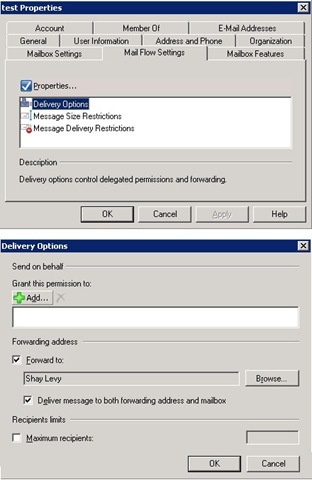
# Check the GUI, Exchange > Recipient Configuration > Mailbox > Test


 RSS Feed


50 comments:
what is the script for disabling mail forwarding?
Clear the ForwardingAddress property:
Set-Mailbox -Identity userName -ForwardingAddress $null
Let's say I want to know if a forwarder has been set on a mailbox, how would I use this script? (for all mailboxen on a server)
Hi Roger,
The info you're looking for is a mailbox ForwardingAddress property. This will list all mailboxes which has this attribute set (Name and ForwardingAddress).
Get-Mailbox -resultSize unlimited -Filter {ForwardingAddress -ne $null} | select Name,ForwardingAddres
Excellent! Thanx!
Hi
Thanks for this post. I have been asked to put a powershell script together to find out who has alt recipient set from a list in a csv file. This csv file will contain a list of smtp addresses to search against do you know how I will go about doing this
That should be fairly easy, say you have a csv file with one column 'email' and below a list of email addresses:
Import-Csv emails.csv | Get-Mailbox -Identity {$_.email} | where {$_.forwardingAddress -ne $null}
Thank you very much for your help much appreciated you have helped me get out of a big hole once again much appreciated
Shay,
Can you tell me how to enable forwarding in a single command for multiple users?
I left you a post on the other forum this afternoon.:)
i have a lot of users from one domain who have to have their email forwarded to another external domain. Is there a way thru the PowerGUI to do this? I have an LDIF dump of all of the email addresses that each of the users have to forward to.
Answer is waiting for you in the other forum :)
This script is awsome thanks, But just wanting to know if you can set a schedule for the forward to start on a certain date?
Sure you can. Save the code in a script file (i.e c:\forward.ps1). Create a new scheduled task, configure it to run at a ceratin date and time.
In the task "Run" box type: "path_to_powershell.exe :\forward.ps1".
Excellent work.
it helped me a lot
thanks!!
Hi Shay, been Google for below solution for a while until i read your post.
I need to put the powershell script to forward the list of CSV mailboxes users to external contact, and the message need to delivers to both mailbox and external contact.
Can you advise on above?
Thanks in advanced!
Hi Boon, can you share the header line of the csv file?
Hi,
can you please help me modifing the delivery option for 1500 users to froward email to their external contact. external contacts are already created in exchange 2007.
thanks
Kooki
With the following command I get my mailbox and forward (to both mailbox and external email) emails to my personal contact object (ShayLContact):
Get-Mailbox Shay | Set-Mailbox -DeliverToMailboxAndForward $true -ForwardingAddress ShayLContact
Hi Shay, the header will be below:
Display name, External SMTP.
Thanks! :)
Hi Shay, this command you provide to Kooki is actually what i'm looking for:
Get-Mailbox Shay | Set-Mailbox -DeliverToMailboxAndForward $true -ForwardingAddress ShayLContact
But i need it to get the mailbox from the CSV file and forward it to the pre-created contact in my Exchange 2007
Can you advise please?
Thanks for your help!
This should be relatively easy. Import the csv file, get the mailbox by the value of the DisplayName and set it to forward messages (locally and externally) to a Contact object id specified in the ExternalSMTP column. Note the -WhatIf switch, it tells you what will happen if you actually executed the command. Remoce it to apply changes.
Import-Csv users.csv | Foreach-Object{
Get-Mailbox $_.DisplayName | Set-Mailbox -DeliverToMailboxAndForward $true -ForwardingAddress $_.ExternalSMTP -WhatIf
}
Thanks for the reply Shayl, this command is for 1 user only, i need to set it up for 1500 users.
Hey Shay! Thanks for your great help!
I will test it and update! :)
Cheers!
Well it depends on how many users you have in the csv file.
so i shall use
Get-Mailbox $_.DisplayName | Set-Mailbox -DeliverToMailboxAndForward $true -ForwardingAddress $_.ExternalSMTP -WhatIf
how can i use it for particular OU?
one more thing i dont want to deliver to mailbox and forward. i just want to forward to external contact.
thanks
To forward emails external only set the value of DeliverToMailboxAndForward to $false (in case you set it $true before) otherwise just remove that parameter.
To perform this action on an OU use the OrganizationalUnit parameter with the OU name (or DN):
Get-Mailbox -OrganizationalUnit OUName
Below is the result. it didnt worked. m i doing some thing worng?
[PS] C:\Documents and Settings\admin>Get-Mailbox -OrganizationalUnit 2000-2001 |
Set-Mailbox -ForwardingAddress $_.ExternalSMTP -WhatIf
What if: Setting mailbox "dom.edu/Students/2000-2001/Ahlam Baflah".
What if: Setting mailbox "dom.edu/Students/2000-2001/Bayan Bin Mahfooz
".
What if: Setting mailbox "dom.edu/Students/2000-2001/Asmaa Al-Turjumi"
.
What if: Setting mailbox "dom.edu/Students/2000-2001/Fajr ElBasree".
You need to loop on the mailboxes with foreach-object and inside of it use the $_.ExternalSMTP value. Outside the foreach scriptblock $_.ExternalSMTP is equel to $null.
Can you please post the command.
thanks
There's no command. Let me explain, when you loop over a csv file you are using the values for each user from the file (display name and external email), I already posted that command.
When you get mailboxes from a specific OU (not a file) you have the user already but you don't have the value for the contact. So you need to supply that value in some way.
The best solution would be using the csv file.
i already have created contacts for every user i wanted to forward email. so shall i delete those contacts and recreate them using this
Import-Csv users.csv | Foreach-Object{
Get-Mailbox $_.DisplayName | Set-Mailbox -DeliverToMailboxAndForward $true -ForwardingAddress $_.ExternalSMTP -WhatIf
}
Let's take one step backwards. Did the following command worked for you?
Import-Csv users.csv | Foreach-Object{
Get-Mailbox $_.DisplayName | Set-Mailbox -DeliverToMailboxAndForward $true -ForwardingAddress $_.ExternalSMTP
}
below is the result
[PS] C:\Documents and Settings\admin>Import-Csv l:\2000.csv |Foreach-Object{Get-
Mailbox -OrganizationalUnit 2000-2001 | Set-Mailbox -deliverToMailboxAndForward
$true -ForwardingAddress $_.ExternalSMTP}
WARNING: The command completed successfully but no settings of
'dom.edu/Students/2000-2001/Ahlam Baflah' have been modified.
WARNING: The command completed successfully but no settings of
'dom.edu/Students/2000-2001/Bayan Bin Mahfooz' have been modified.
OK, it probably worked (I guess you ran it more than one time). Can you confirm that that users were updated with the external contact?
it didnt worked. check all the users.
finally figuerd it out i have to use $_.MailAddress instead of $_.ExternalSMTP
Import-Csv l:\2000.csv | Foreach-Object{Get-Mailbox $_.DisplayName | Set-Mailbox -ForwardingAddress $_.MailAddress}
thanks a looooooooot for you help....u saved me a lot of headache.
Cool, glad you could resolve it :)
Hi Shay, Thanks for your advice, my script is working perfectly now!
You save me a lots of headache!!
Thanks again!!!
Hi Shay, Thanks for your advice, my script is working perfectly now!
You save me a lots of headache!!
Thanks again!!!
Awesome, thanks for the update!
Hi Shay, i've another question. Are we able to use cmdlets to hide the mailbox contact from GAL? Thanks!
ahh... i should google before ask you.
-HiddenFromAddressListsEnabled $true
Thanks!! :)
Exactly ;-)
Hi Shay,
I followed all your steps but still the forwarding is not working on the mailbox. I have external contacts and i want to enable forwarder on the mailbox to those contacts. am getting the below error:
WARNING: The command completed successfully but no settings of 'xyz\ou\abc user' have been modified.
can you please help me with this.
@ghouse
Send me an email to scriptolog at gmail dot com
Is there a way to forward all emails from one account (the boss) to two other accounts (his assistants)? I created a group and forwarded the emails to the group name but it only works for internal mail users not external. Any suggestions?
Fishy question :)
Anyway, create contact objects for each external user and make them a member of a distribution group. Forward emails to the distribution group/
Thank you for this it has saved me hours of work and the possible purchase of 3rd party software!
This has saved me hours of work....
Thank you!
Post a Comment